High Quality AI Stem Splitting: How to Extract Clean Stems With SAM Audio and BS-RoFormer
High quality AI stem splitting comes down to three things: the right model for the job, full-length stereo processing, and restoring the source when it shows compression damage. Use a dedicated fixed-stem model such as BS-RoFormer for vocals, drums, and bass, and Meta's SAM Audio for any other instrument. You get cleaner stems than older stem splitting tools such as Spleeter or early Demucs versions produce.
Producers, DJs, and content creators run into the same problem. You need a clean acapella for a remix, a drumless track for practice, or an isolated guitar riff for sampling. Older stem splitting tools leave you with muddy vocals and ghostly drum artifacts.
This guide explains what stems are, why most stem splitters introduce artifacts, and how to get stems you can use in real production work, including stems from Suno songs.
What Are Stems? Understanding Audio Separation Basics
Stems are individual audio tracks extracted from a mixed song. Instead of one stereo file containing everything, you get separate files for vocals, drums, bass, piano, and other instruments. Each stem contains only that element.
There are dry stems (no effects) and wet stems (with effects such as reverb and compression applied). Dry stems are the ingredients before cooking; wet stems are the finished dish. The models in this article extract wet stems only, so each stem keeps the effects it had in the mix.
Why Stems Matter for Modern Music Production
Stems transform a static stereo mix into flexible parts. When you have high quality stems, you can:
- Create karaoke tracks by removing vocals
- Produce mashups with clean acapella isolation
- Build remixes around the original vocal, the idea behind Spotify's planned AI remix feature
- Rebalance mixes by adjusting individual instrument levels
- Learn songs by soloing specific parts
- Sample elements without bleed from other instruments
- Fix problematic frequencies in isolated tracks
Before AI, stem splitting relied on EQ filtering and phase cancellation, which created artifacts and never fully isolated a part. AI models improved on this by learning to recognize timbre and harmonic structure instead of only filtering frequencies.
The Problem with Most Stem Splitting Services
AI stem splitters are not equal. Many services promise "high quality" but cut corners on the fundamentals:
Playgrounds vs Production Tools
Meta's SAM Audio playground only processes 30-second clips in mono. That is fine for a demo, but not when you need a full song in stereo. See how Neural Analog differs from the SAM Audio playground.
Single Model Limitations
Many services use a single model, which forces trade-offs. Fixed-stem models such as Demucs or BS-RoFormer are good at preset separations (vocals, drums, bass, other) but cannot extract custom instruments like saxophone or synthesizer. Other models offer custom extraction but separate the standard stems less cleanly than specialized tools.
No Audio Restoration Pipeline
Splitting compressed sources like MP3s or streaming rips exposes their existing artifacts. Lower-bitrate MP3s often cut everything above about 16 kHz and add quantization noise that smears transients. A stem splitter that ignores this just isolates damaged audio more clearly.
How SAM Audio Advances Stem Splitting
Meta's SAM Audio is a general source-separation model rather than a dedicated vocal remover. Meta describes it as a single model that accepts text, visual, and time-span prompts, built on a flow-matching transformer and trained on large-scale audio mixtures covering speech, music, and general sounds.
See the Difference: SAM Audio vs. Industry Standards
Below is a real-world comparison. We took a dense classical mix and isolated the piano stem with SAM Audio (Neural Analog) and with a leading competitor.
Example: Piano Extraction Comparison
Isolating a single instrument from a dense stereo mix using the prompt 'piano'.
The Technology Behind SAM Audio
SAM Audio uses a flow-matching transformer to predict the target source from a mixed recording. In Neural Analog Studio, you can describe the source in text and mark a time span where it appears. Visual prompts are part of the research model, rather than a control in the current Studio audio interface. For producers, the difference is control: the model can target sounds outside the fixed categories of vocals, drums, bass, and other.
The Neural Audio Encoder: Why Model Architecture Determines Quality
Every AI stem splitter is built around a neural audio encoder. It turns the raw waveform into a compact representation of timbre, pitch, rhythm, and stereo placement. Think of it as the model's "ears": how well it tells a snare from a vocal depends on how well this encoder was trained.
Early separation models, such as Spleeter, used CNN encoders that treated spectrograms like 2D images. They handled basic vocal and drum splits but struggled with fine timbral detail and consistency over time. Demucs v4 (Hybrid Transformer Demucs) processes both the waveform and the spectrogram, which helps it keep transients and phase intact for a more natural sound. BS-RoFormer splits the spectrogram into frequency bands and models them with Transformer layers. Its paper reports 9.8 dB average SDR on the MUSDB18-HQ benchmark, above Demucs v4. Our Spleeter vs Demucs comparison covers the older models in detail.
SAM Audio goes further with its Perception Encoder Audiovisual (PE-AV), trained on over 100 million video clips. Because it learned from video, it links sounds to the instruments and actions that produce them. That helps when you prompt for something like "guitar," especially when the guitar shares a frequency range with other instruments.
SAM Audio research architecture
dog barking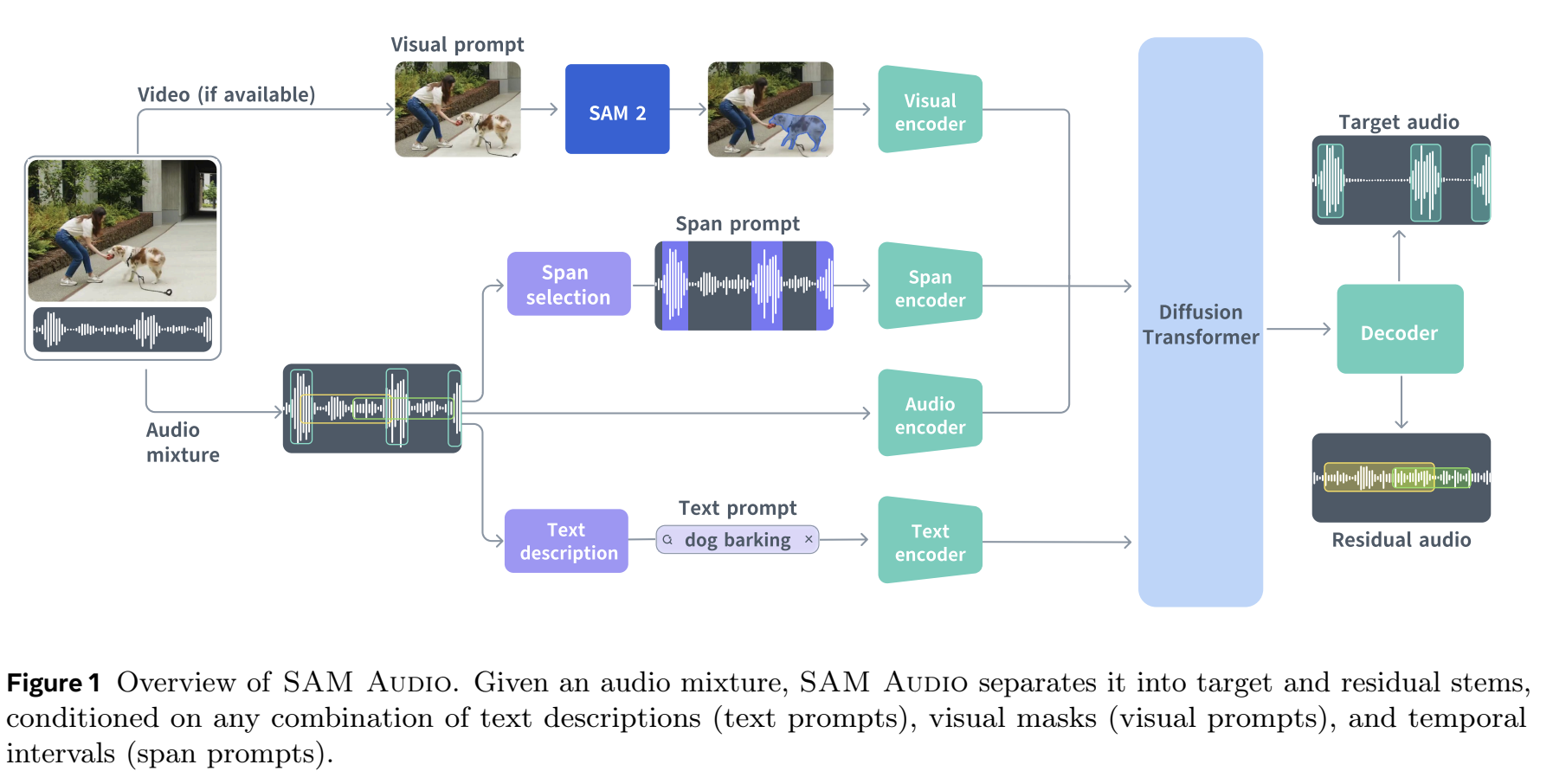
Original figure: SAM Audio research architecture.
The encoder's quality directly impacts stem quality in three ways:
- Timbre resolution: better encoders separate harmonics from noise, so instruments keep their character
- Temporal coherence: stronger encoders keep separation consistent over time, avoiding the "chattering" artifacts common in cheaper tools
- Detail: larger encoders capture string squeaks, breaths, and room ambience
When you compare stem splitting services, ask which model they run, not what the marketing says. Post-processing cannot fully make up for an older encoder.
How Neural Analog Uses SAM Audio and BS-RoFormer
Neural Analog's AI stem splitter turns SAM Audio and BS-RoFormer into a practical tool for musicians.
Unlike the 30-second mono playground, Neural Analog processes complete tracks in full stereo, so stems keep the width and depth of the original mix.
You can choose between SAM Audio and proven fixed-stem presets:
- SAM Audio for custom instrument extraction (saxophone, synthesizer, strings)
- Presets for faster, reliable separations: 4 stems (vocals, drums, bass, other) or 6 stems (adding guitar and piano), powered by BS-RoFormer models, a newer generation of fixed-stem separators than Demucs
With SAM Audio online, you can write a prompt and mark spans in the waveform when the target sound only appears in part of the track. Questions or results to share? Join the Neural Analog Discord.
Integrated Audio Restoration Pipeline
You can run extracted stems through audio restoration to extend their frequency range and clean up some artifacts. Audition the result: restoration does not repair every separation error.
Better Suno Stems: Why AI-Generated Music Needs Special Treatment
Suno and other AI music generators, including Udio and FlowMusic / Producer.ai, often output compressed or bandwidth-limited files. That sets a quality ceiling before stem splitting even begins. To split a Suno song directly from its link, use the Suno stem splitter. Udio no longer offers downloads or stems, so first save your Udio songs as audio files.
The Double Compression Problem
Splitting a Suno MP3 with basic tools separates audio that is already compromised. The stems inherit:
- Severe high-frequency loss (often nothing above 15 kHz)
- Quantization noise embedded in the signal
- Reduced stereo width and depth
- Digital "ringing" artifacts
How Restoration Improves AI-Generated Music
The process targets these limitations step by step:
- Extraction: SAM Audio or a preset model separates the stems
- Artifact removal: neural restoration can reduce MP3 compression noise
- Frequency reconstruction: the model predicts and regenerates harmonic content up to 20 kHz
- Stereo handling: preserve stereo signals while restoring detail, then audition width and phase against the source
The resulting Suno stems sound closer to professionally recorded multitracks.
Step-by-Step: How to Get High Quality Stems Using Neural Analog
Follow these steps for consistent results. The Studio guide to splitting stems covers each control in more detail.
Step 1: Upload Audio
Drag and drop your file, or paste a public link from a supported source such as Suno, FlowMusic, TopMediaAI, Treblo, Mureka, or YouTube. Supported upload formats include MP3, WAV, FLAC, M4A, and OGG. Maximum duration depends on your plan and the selected model.
Step 2: Choose Separation Strategy
For predictable results, open Split and choose 4 stems for vocals, drums, bass, and other, or 6 stems to add guitar and piano. Check the selected Input. These presets run dedicated fixed-stem models and give consistent separation.
For custom instruments, choose Custom Prompt to use SAM Audio. Check the selected Model, then describe the sound. Be specific: electric guitar solo with distortion works better than guitar. SAM Audio returns two complementary stems: the sound matching the prompt and the rest of the recording.
Step 3: Configure Processing
SAM Audio stereo processing: the default Stereo (Mid/Sides) processes the mid (center) and side signals separately, then recombines them. Choose Stereo (L/R) to process the left and right channels separately, or Mono to average them into one channel. These controls apply to SAM Audio; the fixed-stem presets use their own stereo models. See when to use Mid/Side processing.
Step 4: Process and Download
Leave Enhance stems off for separation alone. Review the estimate of processing minutes charged to your balance, then click Start Extraction and wait. Short tracks often finish in a few minutes; longer tracks and heavier models take more time. Review each stem in Studio, then open Export and choose Individual stems for separate files or Combined stems for the current mix.
Step 5: Restore the Extracted Stems
If a stem has missing high frequencies or audible compression damage, select it as the Input under Enhance, choose MP3: Music Restoration for instruments or MP3: Singing Restoration for vocals, and click Start Model Execution. Compare the result before exporting. The MP3-to-WAV restoration guide explains the model choices. To process eligible stems automatically after extraction instead, enable Enhance stems, select the restoration model, and review the extra processing-minutes estimate before starting extraction. Clean stems do not need restoration.
Technical Considerations for Production Workflows
When you add stem extraction to your production workflow, check these factors:
Source File Quality
Restoration can rebuild compressed files, but lossless sources (WAV, FLAC) still give more accurate separation. The encoder has more original information to work with, so less has to be reconstructed.
If your instrument only appears for a few seconds in a long file, mark that span in Studio or trim the file before uploading. The model gets a clearer target, and processing is faster.
Stem Phase Coherence
Stems from the same song should sum back to roughly the original mix. If their phase drifts, recombining them causes comb filtering or cancellation. Neural Analog's models are designed to keep phase relationships intact, which matters for stem mastering and remixing. Check by summing the stems in your DAW and comparing them with the original.
Artifact Audibility
Listen for common separation artifacts:
- Bleed: Instruments appearing faintly in the wrong stem
- Chattering: Rapid switching on/off during extraction
- Smearing: Loss of transient sharpness
- High-frequency loss: Lack of air and detail
Restoration fixes many of these, but a clean source reduces them at the extraction stage. Afterwards, use a DAW to keep only the parts of each stem that sound right.
When to Use Each Model Type
Use the Fixed-Stem Presets (BS-RoFormer) When:
- You need standard vocal, drum, or bass isolation
- Processing speed is critical
- The source mix is relatively clean
- You want predictable, tested results
Use SAM Audio (Custom) When:
- The instrument isn't covered by standard presets
- The mix is dense and overlapping
- You need to separate similar sounds (for example, lead guitar vs. rhythm guitar)
- The source contains unusual instruments or synthesized sounds
Use Restoration When Needed:
- An MP3 or streaming source has audible compression damage
- The original file is below 320 kbps and is missing high-frequency detail
- AI-generated music has a bandwidth cutoff or compression artifacts
- Stems need repair before a commercial release, after checking them by ear
How to Choose the Best AI Stem Splitting Workflow
Start with a test track you know well. Compare the extracted stems against the original mix to check phase coherence and artifact levels. Use the presets for standard splits, SAM Audio for anything else, and restoration when a compressed or AI-generated source needs repair.
With current AI models and restoration, extracted stems can come close to the original multitrack session for remixes, samples, and mix analysis.
High Quality Stem Splitting FAQ
What is the best AI model for stem splitting?
For vocals, drums, bass, and instrumentals, BS-RoFormer and Mel-Band RoFormer models currently score highest on public benchmarks. For instruments outside those fixed stems, a prompt-based model such as SAM Audio is more flexible. See our rankings of the best models for vocals and the best models for instruments.
Does Neural Analog use Demucs for stems?
No. The 4-stem and 6-stem presets use BS-RoFormer models, and custom instrument extraction uses SAM Audio.
Why do my stems sound thin or watery?
Usually because the source is a low-bitrate MP3, or because the tool runs an older model. Start from the best source you have, use a newer model, and restore the stems afterwards. Read whether MP3 upscaling fixes muffled stems to know what restoration can and cannot fix.
Related Guides
- Remove the drums from a finished Suno song: use a drums stem split to get a drumless track.
- Replace Suno drums with your own kit: remove the AI drums, then program a new groove.
- Convert a stereo song to Dolby Atmos: place separated stems in an Atmos bed and objects.