How to Upscale Lossy MP3 Files into High-Quality WAV Files
To upscale MP3 to WAV with a real quality gain, you need AI restoration, not a format converter. Converting an MP3 to WAV makes the file bigger but leaves the sound exactly the same, because MP3 compression permanently removes audio information to save space. Traditional tools cannot reverse that.
AI restoration can rebuild part of what was lost. GPU-accelerated services like Neural Analog reconstruct missing high frequencies, remove compression artifacts, and restore harmonic detail instead of just repackaging the same data. It is the difference between enlarging a pixelated photo and using AI to fill in the missing detail.
This guide explains why simple conversion fails, how neural restoration works, and when it actually improves your music. To try it on your own file, open the MP3 to WAV audio upscaler.
Why Converting MP3 to WAV Does Not Improve Quality
MP3 compression throws away what the encoder predicts you won't notice. It discards masked detail, adds quantization noise, and applies a low-pass filter whose cutoff depends on the bitrate. A 128 kbps MP3 typically cuts everything above 16 kHz. Even a 320 kbps MP3 can cut frequencies above 20.5 kHz, depending on the encoder settings. The result is lost harmonic detail and added artifacts.
When you convert MP3 to WAV in Audacity or iTunes, the MP3 is simply decoded to uncompressed PCM. If you also raise the sample rate, the resampler interpolates between existing samples. Neither step adds detail or brings back what the encoder deleted. The spectrogram shows the same empty band in the high end, just in a larger file.
This is why professionals keep lossless masters. Once audio has gone through a lossy encoder, plain conversion cannot bring it back.
When a Plain MP3 to WAV Conversion Is Enough
If you only need a WAV file because a DAW, video editor, or distributor asks for one, a plain conversion is fine. It keeps the sound the same and avoids adding more compression when you edit and export again. With FFmpeg, one command does it:
ffmpeg -i input.mp3 output.wavUse AI restoration only when you want the file to sound better, not just to change its format.
How to Check Whether Your MP3 Is Missing High Frequencies
Open the file in a free online spectrogram. A lossy MP3 often shows a sharp horizontal line where the high frequencies stop, often around 16 kHz for a 128 kbps file. If the spectrum above that line is dark, restoration has something to rebuild.
Audio Quality Specs That Actually Matter
These specs explain what defines audio quality and why restored files sound better.
Sampling Rate: 44.1 kHz vs 48 kHz
44.1 kHz (44,100 samples per second) is the CD standard. It can represent frequencies up to 22.05 kHz, above the roughly 20 kHz limit of human hearing. 48 kHz is common in video production and gives slightly more headroom.
Most music streaming uses 44.1 kHz, usually with lossy compression on top. When you upscale an MP3, restoration rebuilds missing frequency detail and exports a production-friendly file. Depending on the selected model, Neural Analog keeps 44.1 kHz sources at 44.1 kHz or creates 48 kHz super-resolution outputs. For a worked example, see 203 RPG Maker 2000 sound effects restored from 22.05 kHz to 48 kHz with UniverSR.
Bit Depth: 16-bit vs 24-bit WAV
Bit depth sets the dynamic range: the difference between the quietest and loudest sounds a file can hold.
- 16-bit: 96 dB dynamic range. Fine for final distribution (CDs, streaming).
- 24-bit: 144 dB theoretical dynamic range. Preferred for production, mixing, and restoration.
In a 16-bit file, quiet passages sit closer to the quantization noise floor, so raising them later also raises that noise. 24-bit gives headroom to change levels during processing without adding audible noise.
Why High Frequencies up to 20 kHz Matter
Most audio devices reproduce sound from 20 Hz to 20 kHz, the range young people can hear. With age, and with exposure to loud environments (cars, machinery, concerts, loud music in restaurants), the upper limit usually drops to 16 to 18 kHz.
Take the free online hearing test to check which of these frequencies you can hear.
Humans also don't perceive all frequencies as equally loud. At the same signal level, frequencies near the range of the human voice sound louder than very low or very high ones.
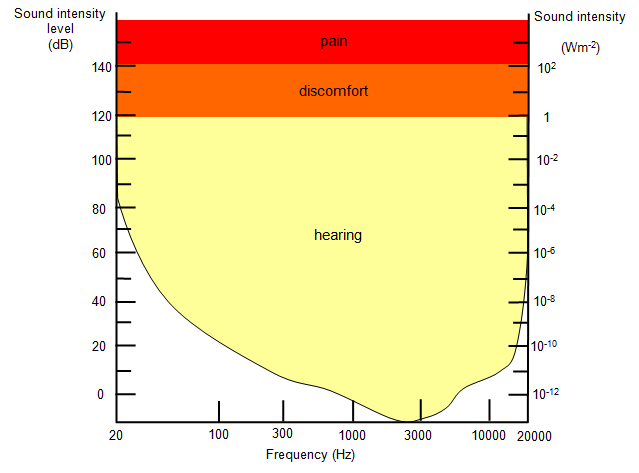
High-frequency content matters even if you can't hear a pure tone above 15 kHz. It shapes spatial feel and transient response: cymbals, string shimmer, and vocal "air" live in this range. It also changes how compressors, limiters, EQs, and reverbs react to the signal.
MP3 removes much of this range, especially at low bitrates. Spectrum recovery rebuilds these frequencies from learned patterns. Even if you cannot hear a pure 18 kHz tone, you can perceive the restored "air" and space, which is why restored tracks sound wider and more open.
Why Streaming and AI Music Sound Compressed
Spotify, Apple Music, and YouTube stream most listeners lossy audio. Even their "high quality" lossy settings discard data. AI music generators like Suno often export bandwidth-limited MP3s, partly because their models were trained on compressed audio. Udio no longer offers downloads; save a recording instead.
This sets a quality ceiling: a great track can still sound muffled. Upscaling raises that ceiling by restoring the missing frequency range.
How Does AI Audio Restoration Work?
Here is a simplified view of how the Neural Analog restoration model works.
Learned Signal Statistics
The model trains on millions of song pairs: pristine studio masters and their MP3 versions. It learns what compression destroys and what natural music looks like. For example, a guitar strum creates specific harmonics, vocals have predictable formants, and drums need phase coherence.
Band-Split Reconstruction
The spectrum is divided into sub-bands. Low frequencies are mostly preserved because compression rarely damages them, while mid and high bands are rebuilt using learned harmonic structure. This keeps the intact low end untouched and focuses the work on the damaged range.
Time-Domain Consistency
The model keeps new detail phase-coherent: added high frequencies line up with the timing of the original waveform. This avoids flanging and smearing, so the result sounds natural rather than processed.
Optimized for Perception
Model outputs are evaluated with objective quality metrics and human listening tests. The goal is musical fidelity, not only technical accuracy: clearer highs, tighter transients, and a larger soundstage.
Before and After: MP3 Restoration Examples
Many AI music generators produce MP3 files that cut off around 16 kHz because their training data was compressed. They sound good but lack the top-end detail of a professional master.
Neural Analog restores these to WAV with frequencies rebuilt up to 20 kHz. The difference is most noticeable in the high frequencies and in passages without drums. Listen to the cymbals, reverb tails, and digital chirps.
Restore missing high frequencies
Low-sample-rate music, old recordings, and AI-generated tracks often lack high frequencies. Neural Analog rebuilds them.
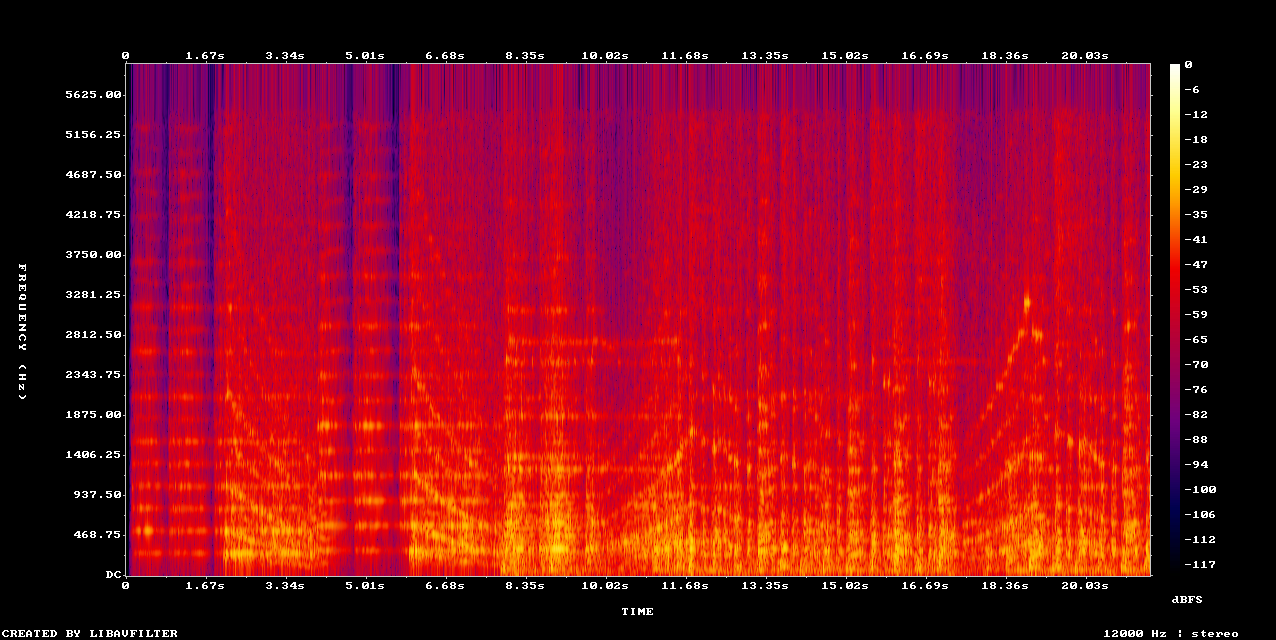
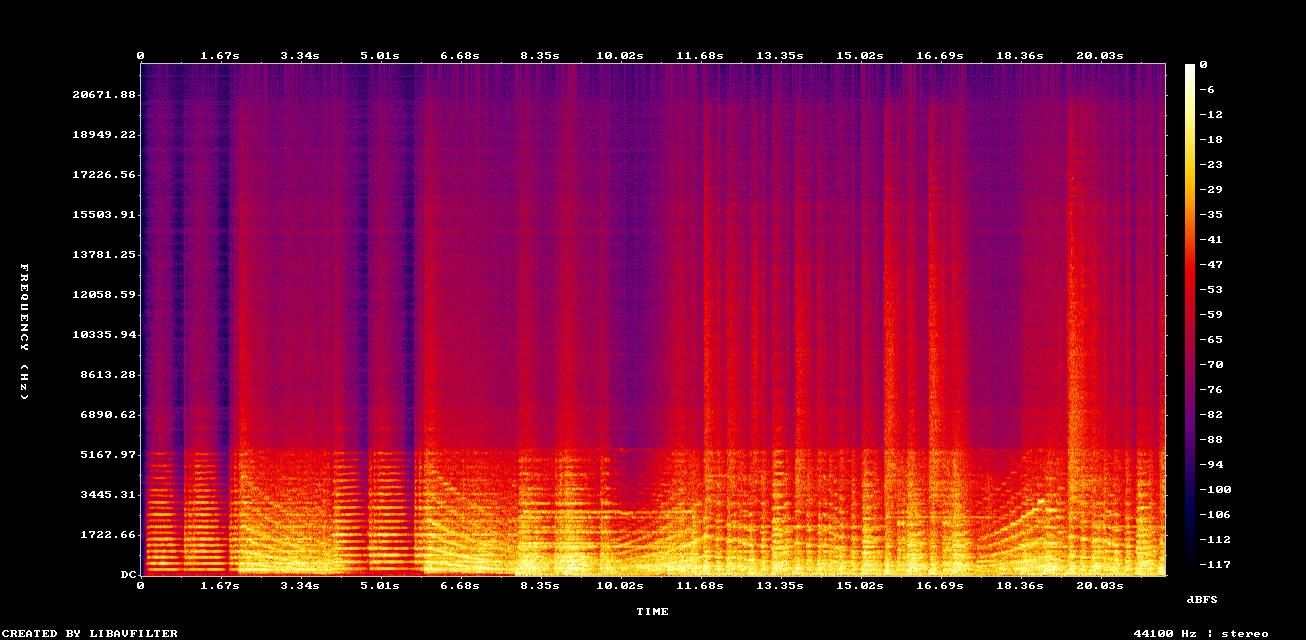
Example: Music Upscaler on low quality mp3 recording
Remove clipping from poor recordings
Clipping happens when the signal exceeds the maximum level a file can store, so the waveform peaks get flattened. Neural Analog removes clipping artifacts while keeping the track loud.
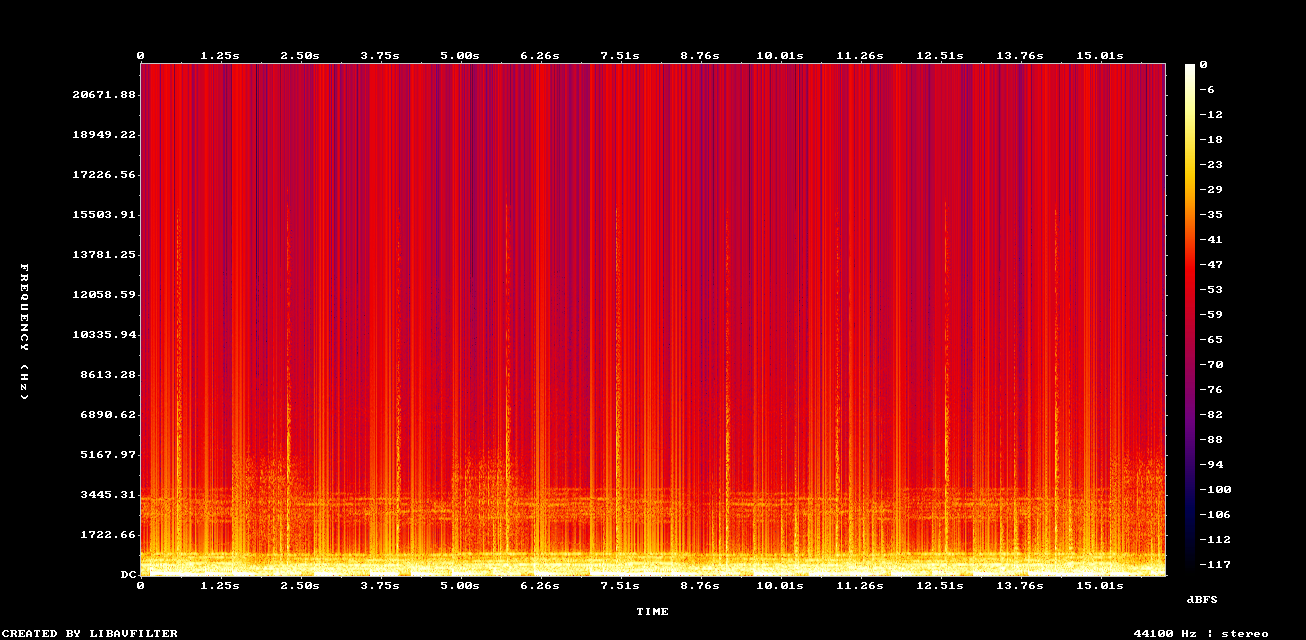
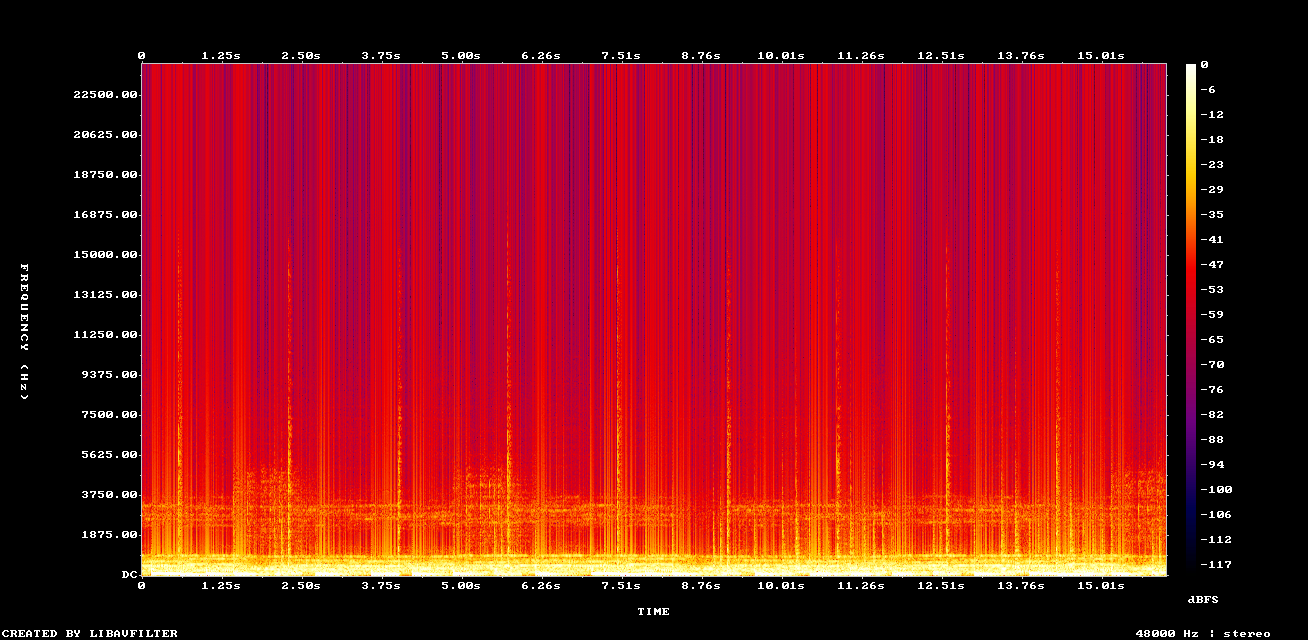
Example: Remove Clipping + DACVAE upscaling on old mp3 file
Upscale English speech audio quality
The NovaSR model upscales voice tracks, singing, and speech.
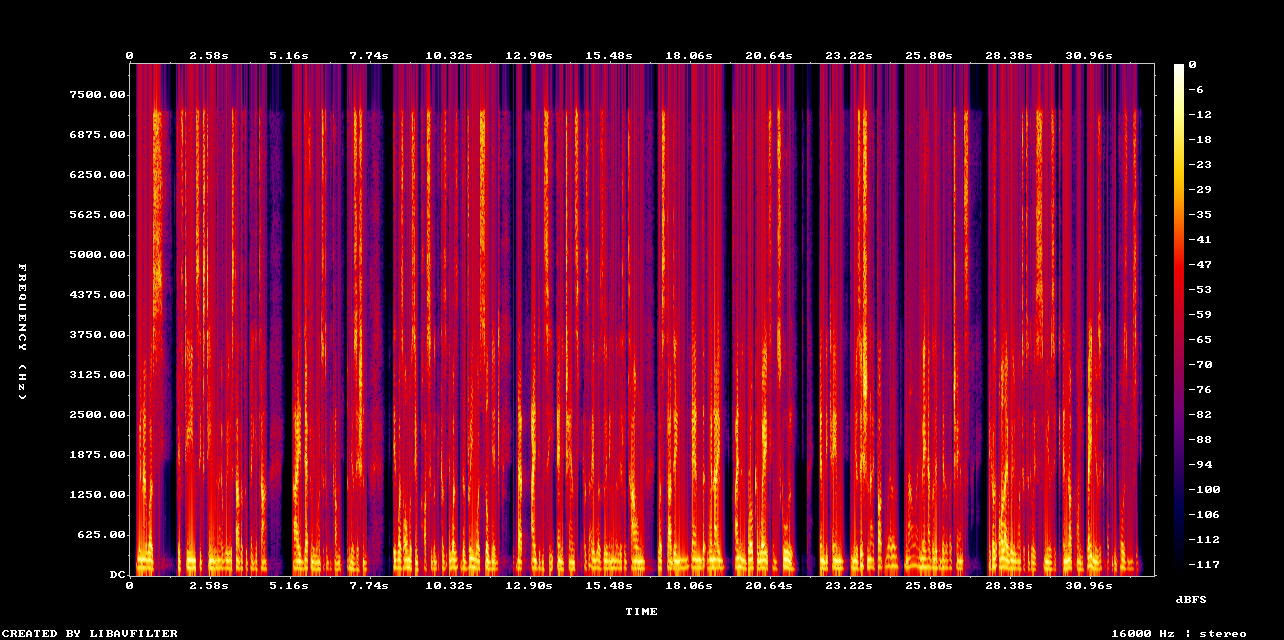
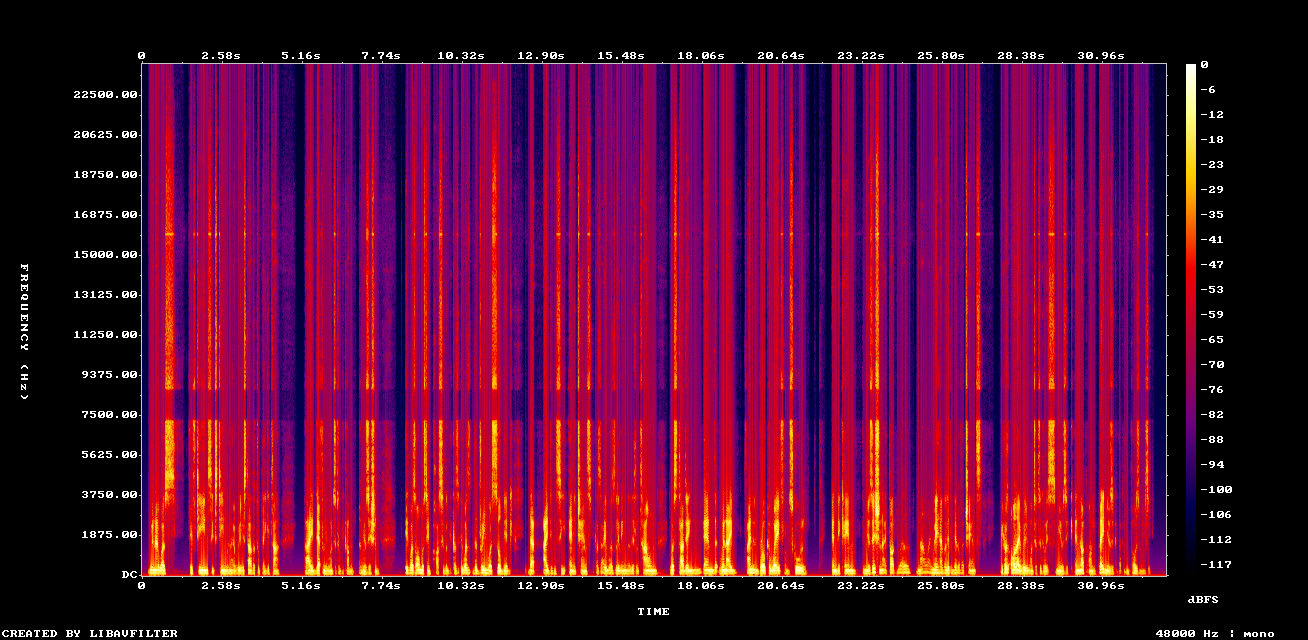
Example: Upscaled speech with NovaSR (mono)
When Should You Upscale MP3 Audio?
Improve AI Music Quality
If you use Suno, Udio, FlowMusic / Producer.ai, or another AI music generator, you may be starting with compressed audio. Upscale right after generation when the source sounds band-limited or full of artifacts, so you mix from better source material. For Suno songs, improving Suno AI audio quality covers the full restore, stem, and master workflow, and fixing AI song audio quality stem by stem explains which restoration model fits vocals, drums, and bass.
Upgrade MP3 Store Downloads to WAV
Beatport, Bandcamp, and other stores sometimes sell MP3s because of licensing. Upscale these to WAV before sample extraction, remixing, or archiving, as explained in why to upscale MP3 samples before using them in a track.
Restore High Frequencies for Remasters
Old MP3 libraries from the 2000s are full of 128 kbps files. Restore them for playback on high-end systems. The difference is clear on good headphones or studio monitors.
Prepare Audio for Mastering
Don't master an MP3 directly. Restore it first, because mastering works best on full-spectrum audio (can I master MP3 files?). Then pick a loudness target with the LUFS guide for mastering AI music.
How to Upscale MP3 to WAV with Neural Analog in Three Steps
You don't need to install Python, manage GPU drivers, or download gigabytes of models. If you do want to run a model on your own machine, follow the AudioSR GitHub install guide. The Getting Started guide to improving audio covers the same steps inside Studio.
Step 1: Import Audio Upload your MP3 or paste a link from Suno, YouTube, FlowMusic, TopMediaAI, or another supported source.
Step 2: Neural Reconstruction Open Enhance, choose MP3 Music Restoration, then click Start Model Execution. Neural Analog processes your audio with generative AI. Short jobs often finish in a few minutes; longer files and heavier models take longer.
Step 3: Download WAV Select the restored result, click Export, and choose WAV, FLAC, or MP3. Download the file, then import it into your DAW and work from the higher-quality version. The export guide explains each format and download option.
No command line or local GPU setup is required.
MP3 to WAV Upscaling FAQ
Are restored frequencies above 16 kHz actually audible?
Yes, depending on age and hearing health. For example, many younger listeners can hear the 17.4 kHz tone called "Mosquitone".
Take the free hearing test to see whether you can hear these frequencies.
These frequencies also affect spatial perception and transient clarity. Even if you cannot hear a pure 18 kHz sine wave, you can perceive the restored "air" and depth, which is why high-resolution audio feels more open.
What Is the Difference Between MP3-to-WAV Upscaling and Simple Conversion?
Simple conversion only decodes the MP3 (and interpolates if you resample). It adds no detail. Neural Analog performs generative reconstruction, similar to AI image upscaling: it predicts and inserts the missing harmonic content.
Does the model just add noise?
No. Unlike enhancers that layer white noise to sound "fuller," neural restoration reconstructs a coherent signal. The model learns to tell musical content from compression artifacts, removing the artifacts and rebuilding the music. The reconstructed spectrograms show this structure.
Can restoration fix my poorly mixed track?
Restoration removes artifacts and extends bandwidth. It can repair some clipping or compression damage, but it cannot fix reverb balance, muddy bass, or arrangement problems. Those are mixing issues. To address them, split the track with Neural Analog's AI stem splitter, restore or rebalance individual stems, then master the finished mix. High quality AI stem splitting explains which separation model to use for each stem.
Is restoration free?
Neural Analog lets you restore short samples for free to test quality. Longer audio uses processing minutes: your included minutes are used first, then any extra minutes you bought.
Should I upscale to 48 kHz or 44.1 kHz?
Most AI generators and music streaming services use 44.1 kHz, the rate you will usually release at. Neural Analog's MP3 restoration keeps 44.1 kHz sources at 44.1 kHz, while super-resolution models output 48 kHz. The difference between 44.1 kHz and 48 kHz is small compared to the gap between compressed and restored audio, so focus on restoration quality rather than sample rate.
Upscaling vs Conversion vs Mastering: Comparison
| Feature | Plain Conversion | Mastering (EQ/Comp) | Neural Analog Restoration |
|---|---|---|---|
| Method | Decoding and interpolation | Frequency/dynamic adjustment | Generative AI reconstruction |
| Bandwidth Extension | No | No | Yes (restores 20 kHz) |
| Artifact Removal | No | Often makes them worse | Yes (de-quantization) |
| Process | Format change or resampling | Polishing | Restoration |
| Best For | Quick format change | Final polish | Quality recovery |
Does Streaming Compression Undo Restoration?
Spotify's "Very High" quality is 320 kbps Ogg Vorbis, and Apple Music's standard streams use 256 kbps AAC. Both are lossy. YouTube also compresses everything heavily.
The final stream will still be compressed, but if you upload a restored WAV, the platform encodes from full-spectrum audio. Re-encoding an already compressed MP3 stacks a second round of artifacts on top of the first.
For producers, the chain is: Restore → Mix → Master → Distribute. Skipping restoration is like filming with a dirty lens: you can color grade later, but the blur remains.
How to Preserve Restored Audio Quality After Upscaling
MP3 dates from the era of dial-up internet and 5 GB iPods. Today's bandwidth and AI tools leave little reason to work from compromised audio.
With Neural Analog, you upload an MP3 and download a WAV with frequencies restored up to 20 kHz. Keep that restored WAV as your source for mixing, mastering, archiving, and distribution, and avoid converting it back to MP3 until the final delivery step. Upscale your first MP3 to WAV.