IRCAM AFTER Model: Setup, Pretrained Models and Training
The AFTER model from IRCAM is a neural audio synthesis model that musicians can control in real time and polyphonically with familiar inputs: MIDI notes or the pitch and loudness of another audio signal.
To try it, download the pretrained models and Max patches from IRCAM's shared folder, install the nn~ external, and open the patch in Max or the Max for Live devices in Ableton Live. To train your own model, install the Python package from GitHub and follow the training steps below.

What is the AFTER Model?
AFTER stands for Audio Features Transfer and Exploration in Real-time. It separates musical expression (structure) from sound identity (timbre) so you can change each one independently.
Earlier "black box" models generate sound from abstract latent coordinates that are hard to steer. AFTER takes explicit controls instead. You can apply the performance of one instrument (such as the pitch curve of a voice) to the learned timbre of another, or play the model entirely from MIDI. Unlike DDSP, which follows only one pitch at a time, AFTER can play chords from MIDI when it was trained on polyphonic data.
To restyle a finished song instead of a single performance, AI remix keeps the vocal stem and regenerates the instrumental from a text prompt.
History and Origin: The ACIDS Team
AFTER comes from the PhD research of Nils Demerlé at IRCAM (Institute for Research and Coordination in Acoustics/Music) in Paris. He worked in the ACIDS group with Ninon Devis, Philippe Esling, Guillaume Doras, and David Genova to address a limitation of variational autoencoders (VAEs).
VAEs such as the RAVE model compress audio well, but pitch and timbre often end up mixed in the same latent dimensions ("entanglement"), so they are hard to control separately. The team presented their solution in the paper "Combining audio control and style transfer using latent diffusion" in August 2024. The goal was to bring the audio quality of diffusion models to live musical performance.

How Does AFTER Work? Latent Diffusion Architecture
AFTER uses conditional latent diffusion. Instead of generating raw audio samples one by one, which is slow, it works in a compressed "latent" space provided by a pretrained autoencoder.

Structure vs. Timbre
AFTER splits sound into two streams:
- The Structure (Local Features): Explicit, time-varying controls.
- Audio Input: Pitch (f_0) and Loudness (A-weighted).
- MIDI Input: Polyphonic piano roll representation.
- The Timbre (Global Features): A learned embedding vector that stays fixed over time and represents the sound's identity (e.g., "Cello", "Distorted Guitar").
Processing Steps
- Compression (The Codec): A neural audio codec (typically a RAVE autoencoder) compresses incoming audio into low-dimensional latent vectors.
- Conditioning: The system extracts pitch and loudness curves (with tools like CREPE or Basic Pitch) to build the structure condition.
- Latent Diffusion: A conditional U-Net predicts the audio latents based on the structure and the target timbre.
- Decoding: The audio codec decodes the predicted latents back into raw waveforms.
How to Train AFTER Models
Training has three stages. The AFTER GitHub repository contains the full scripts. Install AFTER in a Python 3.12 environment:
git clone https://github.com/acids-ircam/AFTER.git
cd AFTER/
pip install -e .1. Dataset Preparation
You need a dataset of audio, typically more than 1 hour for good results (how much data DDSP, RAVE and AFTER each need). If the instrument you want is mixed with others, isolate it first with high quality AI stem splitting.
- Preprocessing: The
after prepare_datasetscript analyzes the audio and extracts the ground-truth features. - Tools: It uses Spotify's Basic Pitch for MIDI transcription and loudness extractors for audio. The data is stored in an LMDB database for fast access during training.
- Check transcription first: to hear how well your material turns into notes before a long training run, try audio to MIDI conversion on a short excerpt. The audio to MIDI guide covers the Studio steps.
Prepare a waveform dataset for the autoencoder first:
after prepare_dataset --input_path /audio/folder --output_path /dataset/path_audio --save_waveform True2. Autoencoder Training (The Codec)
Before training the diffusion model, you need a "codec" that compresses audio.
- Option A: Train a new causal autoencoder with a multi-scale spectral loss and an adversarial hinge loss.
- Option B: Use a pretrained codec from IRCAM's shared folder or a RAVE model as the backend. This is faster if a good model for your type of audio already exists.
For option A, train and export the autoencoder:
after train_autoencoder --name AE_model_name --db_path /dataset/path_audio --config AE_4096 --gpu 0
after export_autoencoder --model_path autoencoder_runs/AE_model_name
The export creates export.ts for offline use and export_stream.ts for real time.
3. Diffusion Model Training
In this stage the model learns how control signals map to sound.
- The Objective: The model minimizes a noise prediction error (MSE). In other words, it learns to remove noise step by step until the target sound remains.
- Disentanglement: An adversarial criterion penalizes the model whenever the timbre encoder picks up pitch information. This keeps the two controls independent.
Encode your audio with the codec, then train the diffusion model:
after prepare_dataset --input_path /audio/folder --output_path /dataset/path_latent --emb_model_path AE_model_run/export.ts
after train --name diff_model_name --db_path /dataset/path_latent --emb_model_path AE_model_run/export.ts --config audio
4. Export for Real-Time Use
Export with after export for the audio-to-audio device, or after export_midi for the MIDI-to-audio device:
after export --model_path after_runs/diff_model_name --emb_model_path AE_model_run/export_stream.ts
after export_midi --model_path after_runs/diff_model_name --emb_model_path AE_model_run/export_stream.ts
The export also writes a .png latent map. The README asks you to keep it with the .ts file.
How to Use AFTER in Real Time: Max for Live and Max/MSP
Max for Live (M4L) Integration
For Ableton Live users, AFTER provides two Max for Live devices that connect Live to the model.
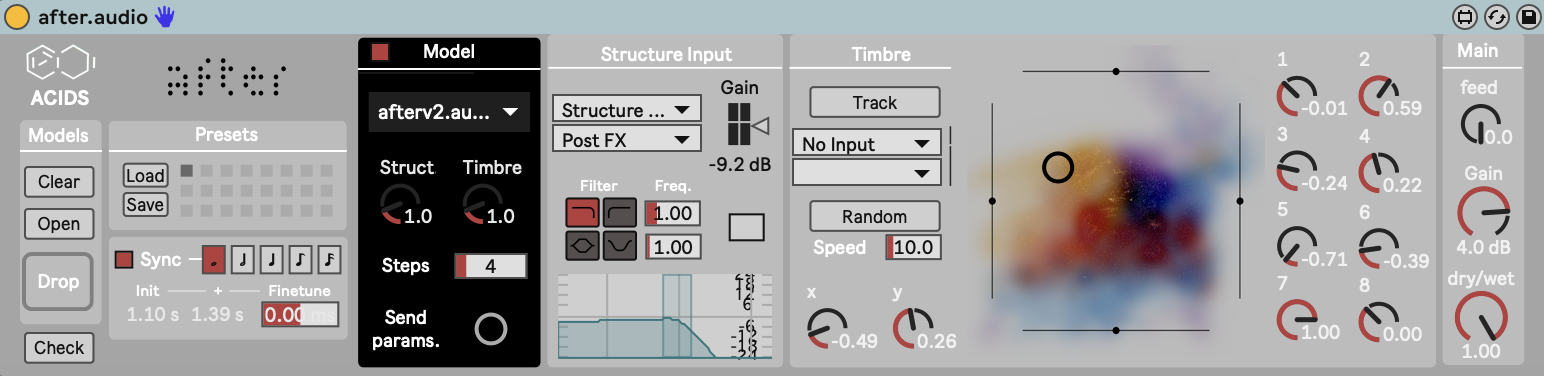
The first is Audio-to-Audio. It uses a sidechain input (e.g., your voice) to drive the pitch and loudness of the neural model.
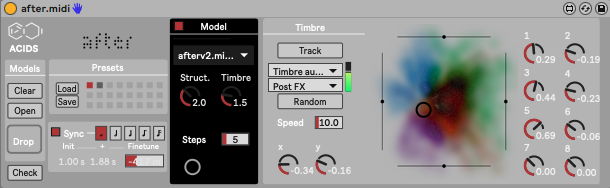
The second is MIDI-to-Audio. It feeds MIDI notes to the model as a piano roll structure input. Thanks to the latent diffusion architecture, it supports polyphony when the model was trained on polyphonic data. To play the same MIDI through recorded samples instead, load an SFZ instrument in sforzando.
Max/MSP and nn~
For developers, AFTER runs inside Max/MSP through the nn~ external, which loads exported TorchScript models (.ts files) directly into a patch.
What Is AFTER's Latency?
AFTER behaves differently from single-pass feed-forward models like RAVE because diffusion needs several steps.
Latency: Each denoising step adds computation, so the real-time implementation typically has 200 to 500 ms of latency. AFTER generates audio on the fly, but playing it feels more like playing through a predictable delay than an instant instrument. In live sets, some artists use a "looper" approach instead: AFTER plays each phrase back on the next loop cycle. For an instrument that responds instantly, small networks like those in free neural guitar amp plugins are the better fit.
GPU utilization: Inference runs through nn~, which supports GPU acceleration, but in practice users notice little difference. Because diffusion is iterative, CPU usage stays high compared to standard DSP.
AFTER FAQ
Is there an AFTER VST plugin?
No. The official repository offers Max for Live devices for Ableton Live and Max patches that run through nn~. It does not mention a VST or AU plugin.
Where are the pretrained AFTER models?
IRCAM hosts pretrained models, pretrained codecs, and Max patches in a shared folder linked from the AFTER README.
Is AFTER the same as IRCAMAX?
No. IRCAMAX is a commercial pack of Max for Live devices from IRCAM, sold by Ableton. AFTER is a research model from IRCAM's ACIDS team with public code on GitHub.
AFTER or RAVE?
RAVE is a single-pass model with lower latency, but its controls are abstract latent dimensions. AFTER adds explicit pitch, loudness, and polyphonic MIDI control on top of a codec, at the cost of more latency and CPU.