DDSP Guide: Magenta DDSP VST, Training and How It Works
DDSP (Differentiable Digital Signal Processing) is Google Magenta's open-source library that lets a neural network control classic sound generators: oscillators, filtered noise, and reverb. Magenta archived the DDSP VST in 2024, but the free plugin still downloads and runs on Windows and macOS. You can also train your own instrument model in a free Google Colab notebook.
This guide starts with those two practical steps. It then explains how DDSP works, where it falls short, and which newer models replaced it.
How to Use DDSP Today: Quick Start
Download and Install the DDSP VST
- Download the plugin for macOS or Windows. Both links come from the official DDSP VST repository.
- Unzip the file. It contains two plugins: DDSP Effect, which turns incoming audio (such as your voice) into an instrument, and DDSP Synth, which you play with MIDI.
- On macOS, copy them to
/Library/Audio/Plug-Ins/Components(AU) and/Library/Audio/Plug-Ins/VST3. On Windows, copy the VST3 files toC:\Program Files\Common Files\VST3. - Rescan your plugins in your DAW.
There is no official Linux build. To hear DDSP without installing anything, try the Tone Transfer web demo.
Train Your Own DDSP Instrument
Magenta's DDSP VST training notebook runs in Google Colab, so you need no local GPU:
- Put at least 10 minutes of
.wavor.mp3audio in a Google Drive folder. Use monophonic audio (one note at a time) from a single recording session, with the same mic and the same room. - Open the notebook, run the install cell (about 5 minutes), then run the training cell and select your folder.
- Wait. Training takes about 2 to 3 hours on free Colab and less than an hour on Colab Pro+. If Colab disconnects, run the cell again with the same folder and training resumes.
- Unzip the downloaded model folder into the plugin's model folder. On a Mac, that is
~/Documents/Magenta/DDSP/Models, and you can also open it from inside the plugin.
The notebook notes that good results usually come after 30,000 to 50,000 training steps. Too few steps sound bland; too many can cause sputtering and big volume jumps.
History and Evolution: From Magenta to Modern Plugins
Magenta Research Lab (2016-2024)
Google's Magenta launched in 2016 as an open-source research project on machine learning for music and art. It released many music generation tools, but most of its projects had been archived by 2024.
Open NSynth Super (2017)
Before DDSP, Magenta introduced Open NSynth Super, a hardware instrument built around NSynth. The NSynth dataset contains about 305,000 single-note samples from 1,006 instruments. The device, built on a Raspberry Pi and a custom PCB, let players morph between instrument sounds in real time.
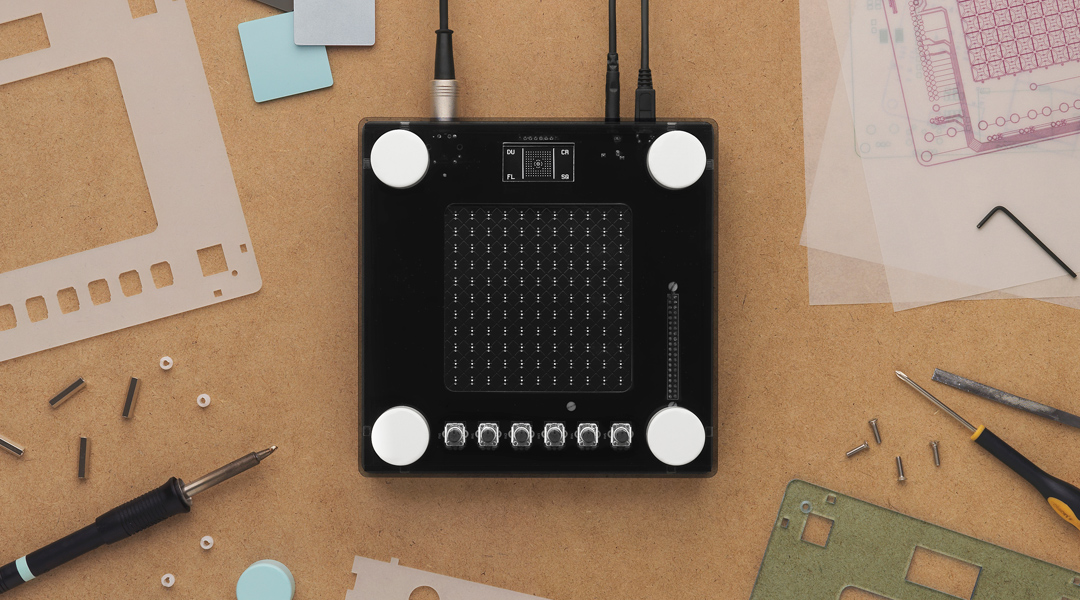
The NSynth model, a WaveNet-style autoencoder, was limited to 16-bit/16 kHz audio because of its computational cost, so the output sounds noticeably lo-fi. Audio engineer Joe Boston described it as "grainy" but found creative uses for it by running it through external effects. The hardware project was archived in August 2025.
DDSP and Tone Transfer (2020)
In 2020, Magenta published the DDSP library and its ICLR paper, which introduced differentiable versions of common signal processing modules. The Tone Transfer web demo let users turn recordings such as singing into violin, saxophone, trumpet, or flute.
The models were RNN-based autoencoders trained on about 10 minutes of monophonic audio per instrument. The demo worked, but the 16 kHz output and limited articulation modeling held it back.
MIDI DDSP and VST Plugin (2022-2024)
Magenta extended DDSP with MIDI DDSP in January 2022. It synthesizes instrument audio directly from monophonic MIDI sequences. To play MIDI through recorded samples instead of a neural model, load an SFZ instrument in the free sforzando player.
In June 2022, Magenta released the DDSP VST plugin for real-time timbre transfer in a DAW. Both projects were archived in 2024 (MIDI DDSP in February, the VST in October).

MAWF Audio Plugin (2023)
Hanoi Hantrakul (yaboihanoi), former tech lead on Tone Transfer and at ByteDance since 2020, launched MAWF in 2023. The free VST/AU plugin runs real-time neural audio synthesis at 48 kHz, removing the 16 kHz limit of earlier DDSP implementations.

How Does DDSP Work? Autoencoders Meet DSP
DDSP is an autoencoder whose decoder drives modular DSP components instead of generating the waveform directly.
DDSP autoencoder architecture
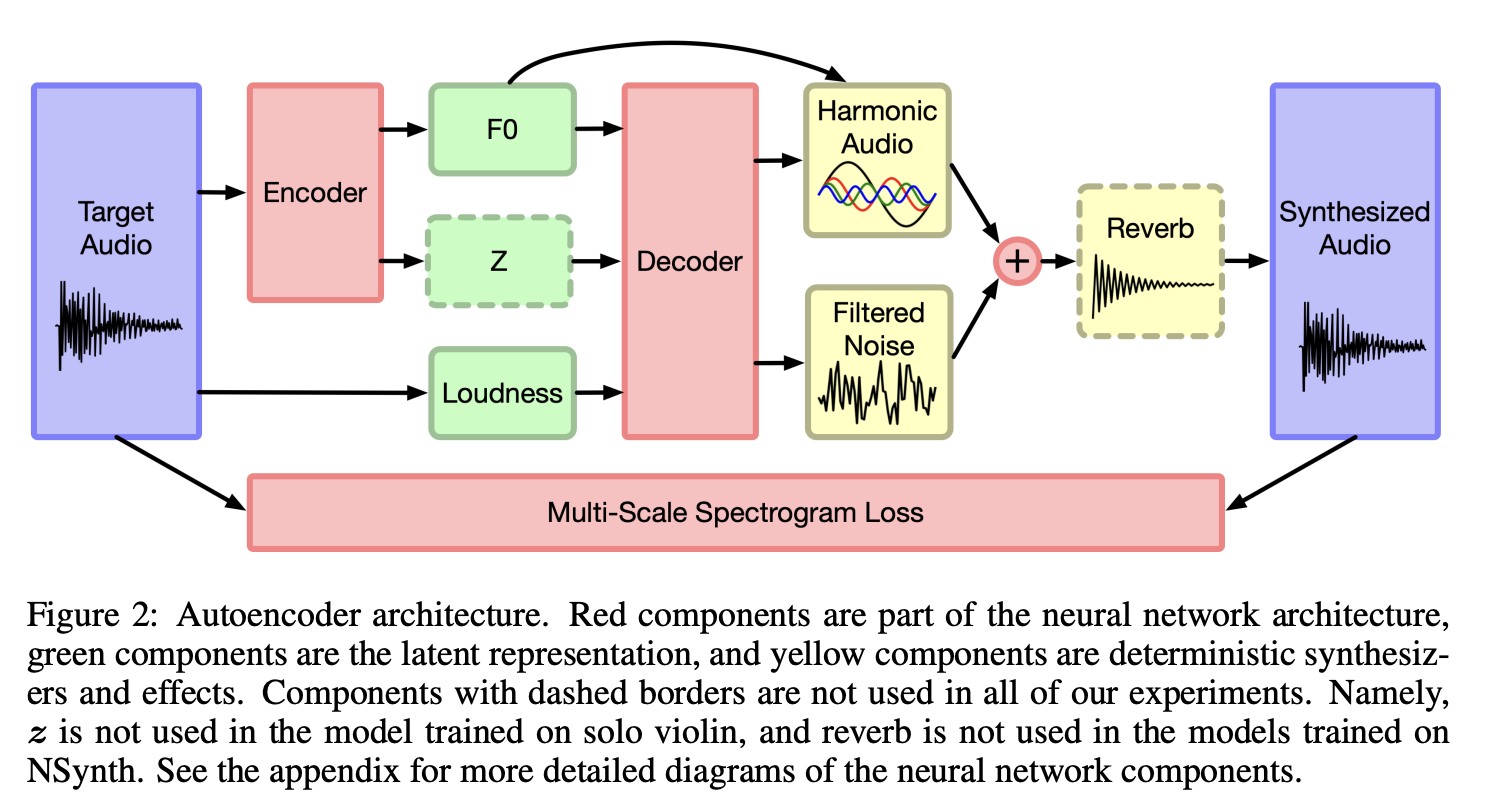
Original figure: DDSP autoencoder architecture.
Encoder
The encoder turns input audio into two control curves: fundamental frequency (f0, the pitch), estimated with a pretrained CREPE pitch tracker, and loudness, computed directly from the signal. An optional residual encoder (a GRU over MFCCs) adds a latent vector for timbre details that pitch and loudness don't capture. These low-dimensional signals describe the performance.
Decoder and Synthesis Modules
A recurrent decoder (GRU) maps the control signals to parameters for three DSP components:
- Harmonic additive synthesizer: generates up to 100 sinusoidal partials at multiples of the fundamental frequency for the pitched part of the sound.
- Filtered noise synthesizer: shapes white noise with time-varying FIR filters to model breath and bow noise.
- Differentiable reverb: adds room acoustics through a learned impulse response.
Every component is differentiable, so the whole model trains end to end with a multi-scale spectral loss. It predicts hundreds of synthesis parameters per frame instead of generating audio sample by sample.
Training DDSP Models for Research
For a model you will play in the DDSP VST, use the DDSP VST training notebook described in the quick start above. To change the architecture or the loss, start from the library's Colab tutorials. They need basic Python skills and cover preprocessing, configuration, and training on a Colab GPU.
DDSP Plugins for Real-Time Use
Magenta's official projects are archived, but you can still run DDSP in a DAW with these tools:
1. Magenta DDSP VST (Archived)
The official DDSP VST still works for experimentation (see the quick start above for install steps). It includes five instrument models and accepts both MIDI and audio input. Users report heavy reverb on the output, which seems to mask artifacts.
2. Neutone FX Platform
Neutone FX offers a free plugin that hosts community-trained models, including DDSP-based timbre transfer networks. It gives producers access to dozens of models beyond the original Magenta instruments.

3. MAWF by yaboihanoi (Recommended)
The MAWF plugin runs DDSP synthesis at 48 kHz inside your DAW. It ships with several instrument models and is the most polished DDSP implementation available.

However, the MAWF download site has been down since November 2025. I'll update this article if I find another source for the plugin.
What Are the Limitations of DDSP?
DDSP's limits come from its architecture and synthesis approach:
- Monophonic only: DDSP models can't generate polyphonic audio. They were trained on monophonic recordings, and the harmonic synthesizer assumes a single fundamental frequency at each time step.
- Audio quality: MAWF's 48 kHz models sound better, but the original 16 kHz implementations have metallic artifacts and little high-frequency content. An audio super-resolution model can regenerate the missing highs of old renders: see how to install and run AudioSR from GitHub, or how UniverSR restored 22 kHz RPG Maker sound effects to 48 kHz.
- Limited GPU parallelism: the recurrent layers process frames one after another, so the model can't parallelize across time on a GPU the way convolutional models can.
Beyond DDSP: RAVE, DDSP-CNN-Tiny and AFTER
RAVE (2021)
RAVE uses causal CNNs instead of RNNs, which brings faster training and 48 kHz synthesis along with better timbre modeling. It is a variational autoencoder refined with adversarial (discriminator) training, and it reaches higher fidelity from a similar amount of data.
DDSP-CNN-Tiny (2022)
DDSP-CNN-Tiny swaps DDSP's RNNs for lightweight CNNs, which shrinks the model and speeds up inference. Audio quality stays comparable, and it runs in real time on a CPU. Small networks running on a CPU are also how free neural guitar amp plugins such as NAM and AIDA-X work. Václav Volhejn developed it for his thesis at ETH Zurich, and his thesis on real-time DDSP is a great technical read.
AFTER (2024)
The AFTER model runs latent diffusion on top of a neural audio codec to reach studio-quality synthesis. It is computationally heavier than DDSP, but its timbre transfer has far fewer artifacts, which makes it a better fit for professional production.
DDSP FAQ
Is Magenta DDSP still maintained?
Partly. The ddsp library is not archived and still receives commits. Magenta archived MIDI DDSP in February 2024 and the DDSP VST in October 2024, so the plugin gets no updates. The plugin downloads and the training notebook still worked when this guide was updated in October 2026.
Does the DDSP VST work on Linux?
There is no official Linux build. You would need to build it from the source code yourself.
Can DDSP play chords?
No. DDSP models are monophonic: they follow one pitch at a time. For polyphonic MIDI control, look at AFTER.
DDSP or RAVE: which should I train?
Pick DDSP for a single pitched instrument when you only have about 10 minutes of audio and a free Colab GPU. Pick RAVE for any kind of sound, including drums, textures, and voices. RAVE needs a few hours of audio and days of GPU training. The FAQ compares how much training audio DDSP, RAVE and AFTER need and which plugin plays each trained model in your DAW.