R
R.
5 满分 5 星
Audio restoration and stem separation
It can bring back clarity without making everything sound too artificial or overprocessed. Stem separation is also surprisingly clean.
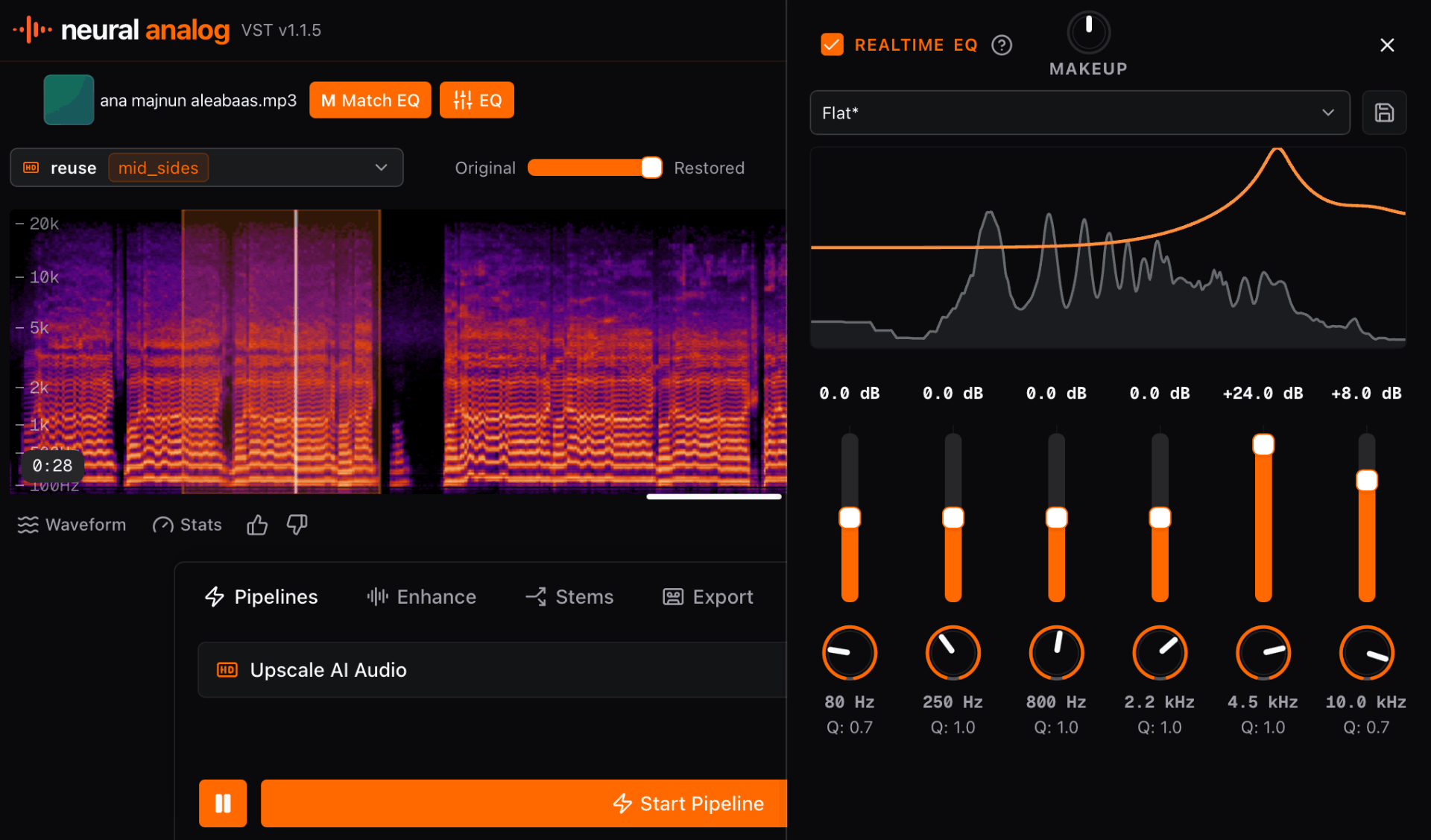
为你的 DAW 安装 Neural Analog(声智模拟),直接在插件中本地处理音频。
一键将你的音乐转为可用于流媒体的 WAV。批量导入曲目,提升音质,分轨,并自动母带处理至商业响度。

Neural Analog(声智模拟) 是一个音效设计平台,重塑制作人采样、塑造和完成音频的方式。它将先进的 GPU 加速分轨、音频升频和 Match EQ 直接带入你的 DAW。用它把充满瑕疵的 AI 生成、低质网络音频或语音备忘录,转化为可用于制作的素材。
Neural Analog(声智模拟) 突破音频处理的极限,让你全身心投入创作。支持 Windows、macOS 和 Linux。
Neural Analog(声智模拟) 连接原始灵感与最终发布,为制作人提供全新的声音交互方式。别让糟糕的音质限制你的创作选择。轻松提升音质,让你的作品更上一层楼。
R.
Audio restoration and stem separation
It can bring back clarity without making everything sound too artificial or overprocessed. Stem separation is also surprisingly clean.
N.
MP3 and CD audio restoration
Does amazing job in restoring Audio from bad quality MP3s and badly extracted audio from CDs. Always my go to for audio restoration.
Amazing tool for audio. Clean, simple, and effective. I would spend hours in RX to get the same results. Give it a try. I can save you hours of production time.
M.
Restoration and mastering
The flash upscaler mixed with the composite mix system makes it super easy to get closer to a song master that I'm happy with
I've been loving the app. The audio restoration works amazing on my suno songs
IMDK
I love the interface. I love the bulk upload/download features. They're a life saver! Also I just realized that Apollo is magic and I don't even need to use denoise. Apollo somehow removes noise much more naturally. So I'm actually spending way less credits than I expected.
Eve St. Jude
Production workflow
Neural Analog has been a godsend to me and my workflow, such a game changer. I'm more thankful than words can express, I don't know what I would have done without it.
Eve
amazing!!!! love this! THANK YOU! I just discovered batch dl, this feature SAVED ME
Wow thank you so much i upscale videos and take out live recordings from music because of my autism i hate the crowd
R.
Audio restoration and stem separation
It can bring back clarity without making everything sound too artificial or overprocessed. Stem separation is also surprisingly clean.
N.
MP3 and CD audio restoration
Does amazing job in restoring Audio from bad quality MP3s and badly extracted audio from CDs. Always my go to for audio restoration.
Amazing tool for audio. Clean, simple, and effective. I would spend hours in RX to get the same results. Give it a try. I can save you hours of production time.
M.
Restoration and mastering
The flash upscaler mixed with the composite mix system makes it super easy to get closer to a song master that I'm happy with
I've been loving the app. The audio restoration works amazing on my suno songs
IMDK
I love the interface. I love the bulk upload/download features. They're a life saver! Also I just realized that Apollo is magic and I don't even need to use denoise. Apollo somehow removes noise much more naturally. So I'm actually spending way less credits than I expected.
Eve St. Jude
Production workflow
Neural Analog has been a godsend to me and my workflow, such a game changer. I'm more thankful than words can express, I don't know what I would have done without it.
Eve
amazing!!!! love this! THANK YOU! I just discovered batch dl, this feature SAVED ME
Wow thank you so much i upscale videos and take out live recordings from music because of my autism i hate the crowd
It worked! Well done :) Many thanks :))))
Bjark
Easy to use and high quality results.


用 Neural Analog(声智模拟)改善 AI 音乐的音质
这些生成内容由 Neural Analog(声智模拟) 用户分享
不需要。Neural Analog(声智模拟) VST 不会在你的电脑上运行其 AI 模型,因此你不需要 GPU。该插件是一个网页视图,需要互联网连接。它的大型 AI 模型在云端运行,可以更快地处理音频。
你的电脑仅用于文件转换和一些音频效果。你可以从 Neural Analog(声智模拟) VST 下载页面 获取该插件。
是的。你可以免费下载并安装 Neural Analog(声智模拟) VST。免费方案允许你导入自己的音频,在样本上预览每个模型,并且每月包含 6 分钟的演示 GPU 处理时长。每次演示最多可处理 30 秒的音频。
每个方案都可以运行每个模型。输入时长限制为:免费版 30 秒,Hobby 5 分钟,Pro 30 分钟,Max 2 小时。
付费方案包含更长的任务、更多的处理分钟数、批处理工具、隐私控制和长期存储。它们也有助于支付 GPU 音频模型、文件存储、下载和后台任务的费用。请在 Neural Analog(声智模拟) 定价页面 上比较各个选项。
如果你想要独立应用以及所有 macOS 插件格式打成一个 zip 包,请下载完整的 macOS 安装包。
在加载 VST3 插件的 DAW 中使用 VST3,例如 Ableton Live、Cubase、Nuendo、Studio One、REAPER、Bitwig Studio、FL Studio 和 Waveform。
下载 macOS VST3 zip,解压后,将 Neural Analog(声智模拟).vst3 复制到你的用户账户的 ~/Library/Audio/Plug-Ins/VST3,或所有用户的 /Library/Audio/Plug-Ins/VST3。如有需要,重启你的 DAW 并重新扫描插件。
如果你使用 GarageBand、Logic Pro、MainStage 或其他 macOS Audio Unit 宿主,请使用 AU。
下载 macOS AU zip,解压后,将 Neural Analog(声智模拟).component 复制到你的用户账户的 ~/Library/Audio/Plug-Ins/Components,或所有用户的 /Library/Audio/Plug-Ins/Components。如有需要,重启你的 DAW 并重新扫描插件。
如果你希望在 DAW 之外使用 Neural Analog(声智模拟),请使用独立应用。下载 macOS 独立版 zip,解压后,将 Neural Analog(声智模拟).app 移动到 Applications。
macOS Gatekeeper 会在你首次打开这个 alpha 版本时,或你的 DAW 首次扫描其中一个插件时显示安全提示。提示出现后,打开系统设置,进入隐私与安全性,滚动到安全性,然后为 Neural Analog(声智模拟) 点击“仍要允许”或“仍要打开”。
对于独立应用,请再次打开 Neural Analog(声智模拟).app。对于 VST3 或 AU,请重启你的 DAW 或插件宿主,并在需要时重新扫描插件。Apple 在 在你的 Mac 上安全地打开应用 中记录了此流程。
如果你想要独立应用以及所有 Windows 插件格式打成一个 zip 包,请下载完整的 Windows 安装包。
如果你希望在 DAW 之外使用 Neural Analog(声智模拟),请使用独立应用。下载 Windows 独立版 zip,解压后,从解压出的文件夹运行 Neural Analog(声智模拟).exe。
在加载 VST3 插件的 DAW 中使用 VST3,例如 Ableton Live、Cubase、Nuendo、Studio One、REAPER、Bitwig Studio、FL Studio 和 Waveform。
注意:在某些 DAW(如 FL Studio)中,不支持 .m4a 默认格式。点击 Export 按钮旁边的“齿轮”图标,然后选择“FLAC”或“MP3”作为默认流式传输格式。
下载 Windows VST3 zip,解压后,将 Neural Analog(声智模拟).vst3 复制到 C:\Program Files\Common Files\VST3,然后重启你的 DAW 并在需要时重新扫描插件。
如果你想要独立应用以及所有 Linux 插件格式打成一个 zip 包,请下载完整的 Linux 安装包。
如果你希望在 DAW 之外使用 Neural Analog(声智模拟),请使用独立应用。下载 Linux 独立版 zip,解压后,从解压出的文件夹运行 Neural Analog(声智模拟) 二进制文件。如果你的桌面环境提示该文件不可执行,请对解压出的二进制文件运行 chmod +x "Neural Analog(声智模拟)"。
在加载 VST3 插件的 Linux DAW 中使用 VST3,例如 REAPER、Bitwig Studio、Ardour 和 Waveform。
下载 Linux VST3 zip,解压后,将 Neural Analog(声智模拟).vst3 复制到你的用户账户的 ~/.vst3,或系统安装的 /usr/lib/vst3。如有需要,重启你的 DAW 并重新扫描插件。
下载插件,安装一次,即可在制作流程中直接使用音频修复、分轨、Match EQ 和母带处理。


