
I've been loving the app. The audio restoration works amazing on my suno songs
Declip music. Bring back the punch.
Reduce crackle and harsh distortion in clipped, heavily limited music. Upload your track, repair damaged peaks, and compare the sound before downloading a restored WAV.
SELECT RESTORATION TYPE
Upload audio
Drag & drop or click to browse (multiple files supported)
Supports: MP3, MPEG, MP2, MPGA, WAV, WAV, AIFF, AIF, AIFF, AIF, FLAC, AAC, OGG, OGA, OPUS, M4A, MP4, WEBM, WMA, ALAC, AMR, MID, MIDIMax size: 50MB.
Or
How to fix clipped audio online
Upload your track
Import your music file or paste a supported music link. Use the best-quality version you have.
Repair clipping distortion
Start with Auto and run declipping to reconstruct flattened peaks in your recording.
Hear the difference
Compare at a similar volume. Listen for less crackle and more natural drum hits, then download your restored WAV.
Examples generated by users
These generations were shared by Neural Analog users
What the loudness war did to music
Clipping and heavy limiting flatten musical peaks. Audio declipping repairs damaged peaks in overcompressed music and loudness-war masters to reduce clipping distortion.
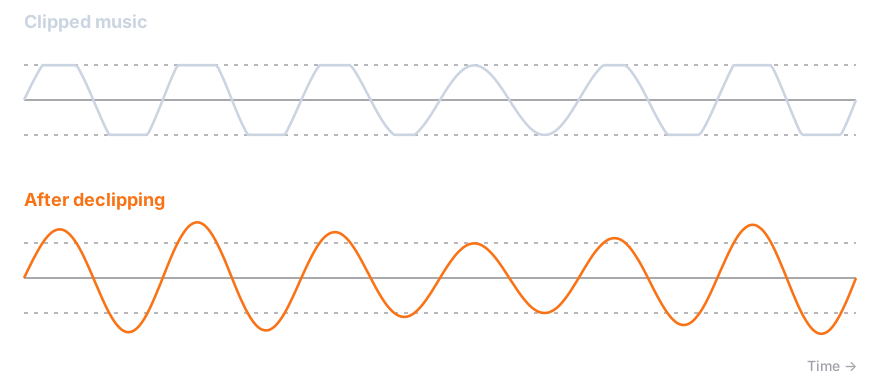
Declipping can reduce clipping distortion, restore drum transients, and increase peak dynamic range. Your music can sound cleaner and punchier, with more room to breathe.
Repair the source before the next master
Start with declipping when the problem is damaged peaks. If your track also has missing high frequencies or compression artifacts, use audio restoration as a separate step. Noise, missing bandwidth, and clipping need different kinds of repair.
Trusted by 70,000+ music lovers

Neural Analog makes me feel like a monkey with an AK-47, in the best way possible

It worked! Well done :) Many thanks :))))

Wow thank you so much i upscale videos and take out live recordings from music because of my autism i hate the crowd

Amazing tool for audio. Clean, simple, and effective. I would spend hours in RX to get the same results. Give it a try. I can save you hours of production time.
I
IMDK
4 out of 5 stars
I love the interface. I love the bulk upload/download features. They're a life saver! Also I just realized that Apollo is magic and I don't even need to use denoise. Apollo somehow removes noise much more naturally. So I'm actually spending way less credits than I expected.
TG
The Grim Tower
5 out of 5 stars
Love it! Makes everything crisp!
SH
Shrunken Head
5 out of 5 stars
IT'S GREAT
F
Francisco
5 out of 5 stars
Sensacional
TS
Tommi, Studionet
5 out of 5 stars
Highend services!
B
Bjark
5 out of 5 stars
Easy to use and high quality results.
E
Eve
5 out of 5 stars
amazing!!!! love this! THANK YOU! I just discovered batch dl, this feature SAVED ME
I've been loving the app. The audio restoration works amazing on my suno songs
Neural Analog makes me feel like a monkey with an AK-47, in the best way possible
It worked! Well done :) Many thanks :))))
Wow thank you so much i upscale videos and take out live recordings from music because of my autism i hate the crowd
Amazing tool for audio. Clean, simple, and effective. I would spend hours in RX to get the same results. Give it a try. I can save you hours of production time.
I
IMDK
4 out of 5 stars
I love the interface. I love the bulk upload/download features. They're a life saver! Also I just realized that Apollo is magic and I don't even need to use denoise. Apollo somehow removes noise much more naturally. So I'm actually spending way less credits than I expected.
TG
The Grim Tower
5 out of 5 stars
Love it! Makes everything crisp!
SH
Shrunken Head
5 out of 5 stars
IT'S GREAT
F
Francisco
5 out of 5 stars
Sensacional
TS
Tommi, Studionet
5 out of 5 stars
Highend services!
B
Bjark
5 out of 5 stars
Easy to use and high quality results.
E
Eve
5 out of 5 stars
amazing!!!! love this! THANK YOU! I just discovered batch dl, this feature SAVED ME
Listen to tracks made by our users


AI audio enhanced with Neural Analog
Frequently Asked Questions
Can clipped audio be fixed?
Clipped audio can often be improved. Declipping estimates damaged peaks to reduce distortion and restore punch, but it cannot recreate the exact original recording. Upload your track to the online music declipper, start with Auto, and compare both versions at a similar volume before downloading your restored WAV.
Can declipping restore the original dynamics of heavily limited music?
Declipping can improve damaged peaks in heavily limited music, but it cannot recover the exact original dynamics from a finished master. A limiter changes gain over time, and the original gain envelope is missing. In the music declipper, upload your track and start with Better Declipper in Auto mode. Compare the source and result at a similar listening level. The experimental Limiter mode works deeper below limiter ceilings and can introduce distortion, so keep it only if your listening comparison favors it.
Should I declip music from an MP3, WAV, or FLAC file?
Declip music from the best source you have. Prefer an original WAV or FLAC over an MP3 made from the same recording, because lossy encoding alters the samples around damaged peaks. If only an MP3 is available, upload it to the music declipping tool and choose Better Declipper in Auto mode to analyze smeared clipping. Converting that MP3 to WAV before upload does not recover missing information. Preview the restored version and export a WAV to avoid another lossy encoding step.
Why can declipped music sound quieter than the original master?
Declipped music can sound quieter because reconstructed peaks need headroom. When Better Declipper restores peaks above the PCM export ceiling, the music restoration tool lowers the whole track just enough to leave 0.1 dB of sample-peak headroom. That avoids clipping the repaired peaks again during WAV export. Compare both versions at similar perceived loudness and listen to drum attacks, vocal roughness, and crackle. A quieter file alone is not proof of successful restoration.
Hear whether your music can sound less crushed
Upload your track, repair clipping distortion, and compare the result. Keep the version that sounds better to you.