Neural Analog guide
Core taskExport the audio you hear in Studio
Render the selected main version or audible combined stem mix, or download the selected individual stem files. Choose the source before the format.
Export in Studio
- Select the version you want on the main track or stem rows.
- Play it before exporting. If the Before / After slider is between the endpoints, that blend is rendered in the final Main or Combined Stems render. Individual stem archives use the selected versions without this blend.
- For stems, set Solo, Mute, levels, and realtime FX before rendering.
- Open Export, choose the source, target, and format, then start the render/download.
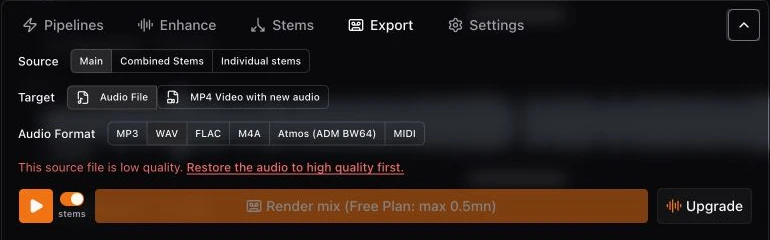
Choose the source
| Source | Exports |
|---|---|
| Main | The version selected on the full-song main track. |
| Combined Stems | The audible stem mix with current versions, Solo/Mute, levels, and mixer processing. |
| Individual stems | The selected original, restored, mastered, or MIDI version of each visible stem in one archive, without realtime mixer processing. |
Choose the format
Use WAV or FLAC for lossless production and archiving. Use MP3 or M4A for smaller listening files. Use MIDI only for completed note data, not audio. Individual stem archives support MP3, WAV, FLAC, M4A, and MIDI.
For ADM BW64, use the separate Dolby Atmos guide.
Download individual stems as an archive
Choose Individual stems, select MP3, WAV, FLAC, M4A, or MIDI, and click Render stems and download ZIP. The archive is prepared in the background with live progress. While it runs, use Send by email to receive the link when ready, or Cancel to stop it. Reopening the same track and export selection restores its progress; you do not need to start another export.
For MIDI, select a completed MIDI version on each stem row you want to include. The archive contains only those selected MIDI versions as separate .mid files. Hidden stems, stems with an audio version selected, and other available MIDI versions are excluded. If none are selected, select a MIDI version before starting the download.