Neural Analog guide
Core taskUnderstand processing minutes
Importing and listening are free. Processing minutes are used when restoration, mastering, separation, transcription, or another model starts. See the processing-minute explanation for details.
What uses minutes
| Action | Processing minutes |
|---|---|
| Upload files or import supported links | None |
| Play, Solo, Mute, mix, or adjust realtime FX | None |
| Start a model, stem extraction, or pipeline on one open track | Uses minutes; no estimate is shown |
| Start a model or pipeline on a batch | Estimate shown before confirmation |
Batch operations show an estimate
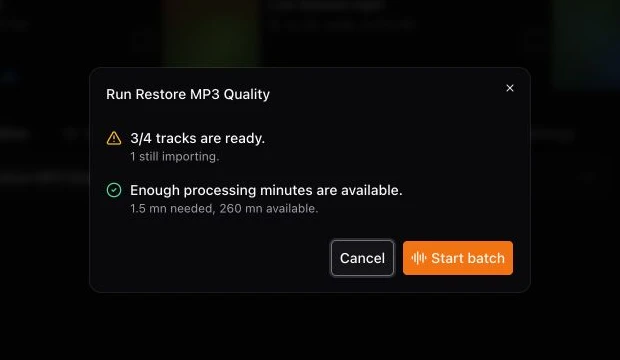
When you process several selected tracks, the confirmation shows how many are ready, the estimated processing-minute use, and your available balance.
How processing usage is calculated
Usage depends on the input-audio duration and the selected model or pipeline, not the time the job spends running. Pipelines can process the audio more than once, so their steps are added together. See What are processing minutes? for current examples and the minimum billed duration.
Check your available balance
To check your usage and remaining minutes, open the avatar menu in the top-right corner of the page, or go to Settings → Usage.
Internal processing failures do not consume minutes
A job that fails because of an internal server error does not use processing minutes. Read the job error before retrying. In a partial batch, completed items remain available and only failed items need attention.