Neural Analog guide
Core taskImprove low-quality audio
Repair MP3 compression damage, rebuild weak high frequencies in AI music, or remove steady noise. Test the model on a short problem section before processing the complete song.
Choose the pipeline from the problem
| What you hear | Start with |
|---|---|
| Dull MP3/web import, swishy cymbals, smeared transients | Restore MP3 Quality |
| AI song with missing or incoherent high frequencies | Upscale AI-generated music / UniverSR (High-Frequency Restoration) |
| Steady hiss or background noise | Remove noise and hissing |
| Noisy or reverberant speech/vocals | RE-USE Upscaler (Speech Enhancement) |
This example shows how to identify and reduce the persistent hiss often heard in generated Suno audio.

Run the model in Studio
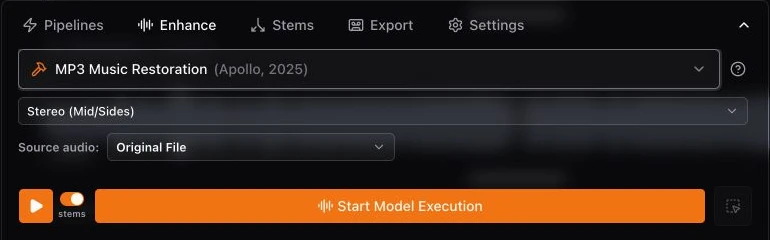
- Open Pipelines for a named pipeline, or Enhance to choose one model directly.
- The imported file is selected as the input audio by default. Change Input only to process another version, a stem, or a current mix.
- Choose the model and set its strength and channel options.
- Check how processing minutes are counted and choose Start Model Execution.
Test a short section first
- Find 10 to 30 seconds where the defect is easy to hear.
- Drag across that part of the waveform. The selected range becomes the job duration. See waveform selections for the other region controls.
- Run and compare the result before replacing the range with a longer selection.
Review the orange restored version
The completed result appears in the same track's version menu with an orange restoration icon. Select it and use the Before / After slider to compare it with the source. Keep the original when the test is not an improvement.